using System;
using System.Collections.Generic;
using System.Text;

namespace ConsoleApplication1
{
    class Program
    {
        static void Main(string[] args)
        {
            if (args.Length >= 1)
            {
                for(int i=0;i<args.Length;i++)
                    Console.WriteLine("args" + i.ToString() + ": " + args[i]);
            }

            ////包含下边语句WindowsFormsApplication调用时会出错:ConsoleApplication1 遇到问题需要关闭。
            //Console.ReadKey();
        }
    }
}WindowsFormsApplication1代码:
using System;
using System.Collections.Generic;
using System.ComponentModel;
using System.Data;
using System.Drawing;
using System.Text;
using System.Windows.Forms;
using System.Diagnostics;

namespace WindowsFormsApplication1
{
    public partial class Form1 : Form
    {
        public Form1()
        {
            InitializeComponent();
        }

        private void button1_Click(object sender, EventArgs e)
        {
            try
            {
                System.Diagnostics.Process p = new System.Diagnostics.Process();
                p.StartInfo.UseShellExecute = false;
                p.StartInfo.CreateNoWindow = true;
                p.StartInfo.WindowStyle = ProcessWindowStyle.Hidden;
                p.StartInfo.RedirectStandardOutput = true;
                p.StartInfo.FileName = @"E:\Demo\ConsoleApplication1\bin\Debug\ConsoleApplication1.exe";
                p.StartInfo.WorkingDirectory = @"E:\";
                p.StartInfo.Arguments = "www mzwu com";
                p.Start();
                p.WaitForExit();
                MessageBox.Show(p.StandardOutput.ReadToEnd());
                p.Close();
            }
            catch (Exception ex)
            {
                MessageBox.Show(ex.ToString());
            }
        }
    }
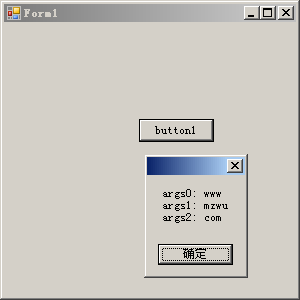
}效果图:
评论(0)
暂无评论。