<%@ CodeTemplate Language="C#" TargetLanguage="C#" %>
<%@ Property Name="NameSpace" Type="String" %>
<%@ Property Name="ClassName" Type="String" %>
<%@ Property Name="Author" Type="String" %>
<%@ Property Name="HavFun" Type="Boolean" %>
////////////////////////////////////////////////
// File:<% =ClassName %>.cs
// Description: Enter summary here after generation.
// Author:<% =Author %>
// Date:<% =DateTime.Now.ToString("yyyy-MM-dd HH:mm:ss") %>
////////////////////////////////////////////////
using System;
using System.Collections.Generic;
using System.Text;

namespace <% =NameSpace %>
{
    public class <% =ClassName %>
    {
        public <% =ClassName %>()
        { }

		<% if(HavFun) { %>
        public int Add(int a, int b)
        {
            return a + b;
        }
		<% }%>
    }
}说明
·CodeTemplate指令表示当前文件是一个CodeSmith模板,使用C#语言;
·Property指令为当前模板定义一些属性,可在属性面板中设置各属性值,在模板的其他地方可通过属性名进行引用;
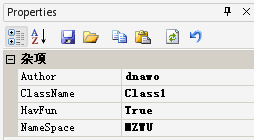
运行后生成代码如下:
////////////////////////////////////////////////
// File:Class1.cs
// Description: Enter summary here after generation.
// Author:dnawo
// Date:2009-07-09 02:05:08
////////////////////////////////////////////////
using System;
using System.Collections.Generic;
using System.Text;

namespace MZWU
{
    public class Class1
    {
        public Class1()
        { }

        public int Add(int a, int b)
        {
            return a + b;
        }
    }
}常见问题
问:生成代码出错,提示"c:\Documents and Settings\kuang\Application Data\CodeSmith\v4.1\Template Cache\1_cst.cs(40,16): error CS1518: 应输入 class、delegate、enum、interface 或 struct"?
答:将模板文件名改为非数字开头即可。
评论(0)
暂无评论。