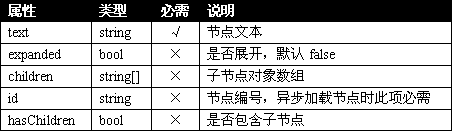
·简单的节点对象:{"text":"mzwu.com"}
·包含子节点对象(异步):{"text":"other","id":"other","hasChildren":"true"}
·包含子节点对象(非异步):{"text":"ftp","children":[{"text":"aaa.com"},{"text":"bbb.com"}]}
说明
异步获取节点数据时,treeview会使用get方式提交一个参数(root)到服务器端,treeview初始化(首次加载)时,这个参数值为source,之后异步获取子节点时,参数值为所点击节点的id值,服务器端需根据这一参数值不同返回不同的json对象数组:
demo.htm
<!DOCTYPE html PUBLIC "-//W3C//DTD XHTML 1.0 Transitional//EN" "http://www.w3.org/TR/xhtml1/DTD/xhtml1-transitional.dtd">
<html xmlns="http://www.w3.org/1999/xhtml">
<head>
<meta http-equiv="Content-Type" content="text/html; charset=gb2312" />
<title>jquery.treeview.async示例-Mzwu.Com</title>
<link href="lib/jquery.treeview.css" rel="stylesheet" type="text/css" />
<script language="JavaScript" type="text/javascript" src="lib/jquery.js"></script>
<script language="JavaScript" type="text/javascript" src="lib/jquery.cookie.js"></script>
<script language="JavaScript" type="text/javascript" src="lib/jquery.treeview.min.js"></script>
<script language="JavaScript" type="text/javascript" src="lib/jquery.treeview.async.js"></script>
<script type="text/javascript">
$(document).ready(function(){
	$("#treeview").treeview({
		url: "treeview.asp"
	})
});
</script>
</head>

<body>
<ul id="treeview"></ul>
</body>
</html>treeview.asp:
<% If Request.QueryString("root")="source" Then %>
[{"text":"mzwu.com"},{"text":"other","id":"other","hasChildren":"true"}]
<% End If %>

<% If Request.QueryString("root")="other" Then %>
[{"text":"ftp","expanded":"true","children":[{"text":"aaa.com"},{"text":"bbb.com"},{"text":"ccc.com"}]},{"text":"web","children":[{"text":"xxx.com"},{"text":"yyy.com"},{"text":"zzz.com"}]}]
<% End If %>扩展
为json节点对象增加了两个属性:url和target,表示节点链接地址和打开链接的窗口,jquery.treeview.async修改如下:
/*
 * Async Treeview 0.1 - Lazy-loading extension for Treeview
 *
 * http://bassistance.de/jquery-plugins/jquery-plugin-treeview/
 *
 * Copyright (c) 2007 Jörn Zaefferer
 *
 * Dual licensed under the MIT and GPL licenses:
 *   http://www.opensource.org/licenses/mit-license.php
 *   http://www.gnu.org/licenses/gpl.html
 *
 * Revision: $Id$
 *
 */

;(function($) {

function load(settings, root, child, container) {
	$.getJSON(settings.url, {root: root}, function(response) {
		function createNode(parent) {
			var current = $("<li/>").attr("id", this.id || "").html("<span>" + this.text + "</span>").appendTo(parent);
			[color=Red]if (this.url) {
				current.children("span").html("<a href='"+this.url+"' target='"+(this.target||"_blank")+"'>"+this.text+"</a>");
			}[/color]
			if (this.classes) {
				current.children("span").addClass(this.classes);
			}
			if (this.expanded) {
				current.addClass("open");
			}
			if (this.hasChildren || this.children && this.children.length) {
				var branch = $("<ul/>").appendTo(current);
				if (this.hasChildren) {
					current.addClass("hasChildren");
					createNode.call({
						text:"placeholder",
						id:"placeholder",
						children:[]
					}, branch);
				}
				if (this.children && this.children.length) {
					$.each(this.children, createNode, [branch])
				}
			}
		}
		$.each(response, createNode, [child]);
        $(container).treeview({add: child});
    });
}

var proxied = $.fn.treeview;
$.fn.treeview = function(settings) {
	if (!settings.url) {
		return proxied.apply(this, arguments);
	}
	var container = this;
	load(settings, "source", this, container);
	var userToggle = settings.toggle;
	return proxied.call(this, $.extend({}, settings, {
		collapsed: true,
		toggle: function() {
			var $this = $(this);
			if ($this.hasClass("hasChildren")) {
				var childList = $this.removeClass("hasChildren").find("ul");
				childList.empty();
				load(settings, this.id, childList, container);
			}
			if (userToggle) {
				userToggle.apply(this, arguments);
			}
		}
	}));
};

})(jQuery);资源
·官方站点:http://bassistance.de/jquery-plugins/jquery-plugin-treeview/
·下载地址:点击下载
评论(0)
暂无评论。