下边的示例演示如何在Background Page记录图标的点击次数:
manifest.json:
{
  "name": "My First Extension",
  "version": "1.0",
  "description": "The first extension that I made.",
  "background_page": "background.html",
  "browser_action": {
    "default_icon": "icon.png",
	"popup": "popup.html"
  }
}background.html:
<!DOCTYPE html PUBLIC "-//W3C//DTD XHTML 1.0 Transitional//EN" "http://www.w3.org/TR/xhtml1/DTD/xhtml1-transitional.dtd">
<html xmlns="http://www.w3.org/1999/xhtml">
<head>
<meta http-equiv="Content-Type" content="text/html; charset=gb2312" />
<title>background.html</title>
</head>

<body>
<script language="JavaScript" type="text/javascript">
var Clicks = (function(){
					var i = 0;
					return function(){ return ++i; }
				})();
</script>
</body>
</html>popup.html:
<!DOCTYPE html PUBLIC "-//W3C//DTD XHTML 1.0 Transitional//EN" "http://www.w3.org/TR/xhtml1/DTD/xhtml1-transitional.dtd">
<html xmlns="http://www.w3.org/1999/xhtml">
<head>
<meta http-equiv="Content-Type" content="text/html; charset=gb2312" />
<title>popup.html</title>
</head>

<body>
<script language="JavaScript" type="text/javascript">
var winBackgroundPage = chrome.extension.getBackgroundPage();
if(winBackgroundPage)
	document.write("Clicks:" + winBackgroundPage.Clicks());
</script>
</body>
</html>效果预览:
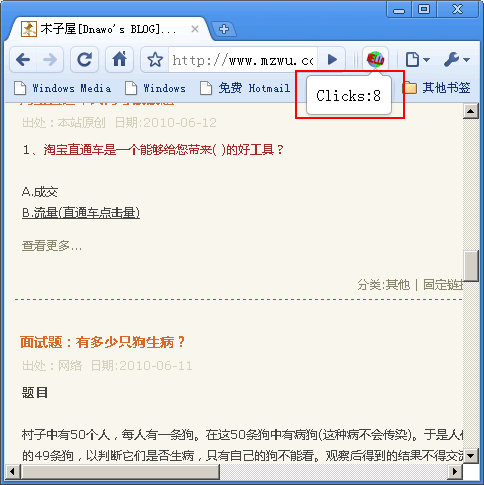
评论(0)
暂无评论。