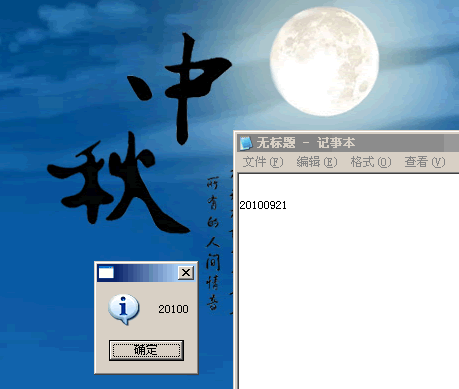
如上图所示,按键精灵根据附件中的图片在整个屏幕上找到记事本左上角的坐标,偏移后得出数字左上角的坐标,最后通过匹配得出是什么数字。代码如下:
//8.x语法
Dim w, h
Dim x, y
Dim code, i
const CODELENGTH = 5

w = Plugin.Sys.GetScRX
h = Plugin.Sys.GetScRY
//在整个屏幕上找图片,并返回左上角坐标
FindPic 0,0,w,h,"Attachment:\a.bmp",0.9,x,y
If x>0 And y>0 Then
	//偏移后得到数字左上角坐标
	x = x + 7
	y = y + 71
	For i=1 To CODELENGTH
		code = code & GetNum(x,y)
		x = x + 5 + 1
	Next
	MessageBox code
Else
	MessageBox "验证码位置查找失败!"
End If

EndScript

//******************* 函数,子过程开始 *******************

//功能:获取图片上某个范围内的一个数字
//参数:
//        intX:数字左上角x坐标值
//        intY:数字左上角y坐标值
Function GetNum(intX, intY)
    Dim num(9)
    Dim pixelcolor, str, i

    //0-9特征码
    num(0) = "0111010001100011000110001100011000101110"
    num(1) = "0010001100001000010000100001000010001110"
    num(2) = "0111010001100010001000100010001000011111"
    num(3) = "0111010001000010011000001000011000101110"
    num(4) = "0001000110010100101010010011110001000011"
    num(5) = "1111110000100001111000001000011000101110"
    num(6) = "0111010010100001111010001100011000101110"
    num(7) = "1111110010000100010000100001000010000100"
    num(8) = "0111010001100010111010001100011000101110"
    num(9) = "0111010001100011000101111000010100101110"

    //每个数字占像素5*8,循环得到各个像素上的颜色值
    For i=0 To 39
        pixelcolor = GetPixelColor(intX + i mod 5, intY + i \ 5)
        If pixelcolor="000000" Then
            str = str & "1"
        Else
            str = str & "0"
        End If
    Next

    //返回结果0-9,未知则为"?"
    GetNum = "?"
    For i=0 To UBound(num)
        If num(i) = str Then
            GetNum = i : Exit For
        End If
    Next
End Function

//******************* 函数,子过程结束 *******************
评论(0)
暂无评论。