FCKeditor.Net下载:http://sourceforge.net/projects/fckeditor/files/FCKeditor.Net/2.6.4/
FCKeditor下载:http://sourceforge.net/projects/fckeditor/files/FCKeditor/2.6.4/
说明:FCKeditor.Net中不包含主要文件,所以仍然需要下载FCKeditor,这在官方站点中有说明。
The main code is not included in this package, just the ASP.Net Control. You still need the FCKeditor scripts to be able to run it, so download it too.
2.安装到站点
①.将FCKeditor_2.6.4.zip解压到网站根目录中;
②.解压FCKeditor.Net_2.6.4.zip,在vs中打开站点,引用FredCK.FCKeditorV2.dll,同时将其添加到工具箱中;
3.文件修改
①.打开FCKeditor\fckconfig.js,找到下边语句:
var _FileBrowserLanguage	= 'php' ;
var _QuickUploadLanguage = 'php' ;修改为:
var _FileBrowserLanguage	= 'aspx' ;
var _QuickUploadLanguage = 'aspx' ;②.打开FCKeditor\editor\filemanager\connectors\aspx\config.ascx,修改CheckAuthentication方法,根据用户角色返回true或false,返回false用户不能使用FCKeditor,页面会弹出提示:
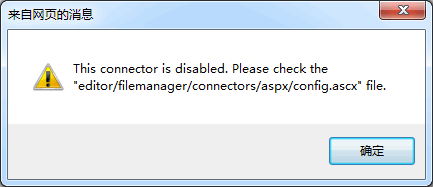
代码修改示例:
private bool CheckAuthentication()
{
    return Session["UserLogin"] != null;
}③.打开FCKeditor\editor\filemanager\connectors\aspx\config.ascx,修改SetConfig方法中的UserFilesPath变量,设置文件上传路径,注意需要给"NETWORK SERVICE"用户分配写入权限;
④.在Web.config文件appSettings节中配置FCKeditor文件夹和文件上传路径[可选]:
<appSettings>
  <!-- FCKeditor编辑器文件夹,默认为/fckeditor/ -->
  <add key="FCKeditor:BasePath" value="/FCKeditor/"/>
  <!-- 文件上传文件夹,优先级:Session>Application>Web.config>config.asxc -->
  <add key="FCKeditor:UserFilesPath" value="/Upload/Files/"/>
</appSettings>4.使用FCKeditor
使用方法和.NET服务器端控件一样,从工具箱中将FCKeditor控件拖动到页面中就可以了,使用FCKeditor.Value即可获取编辑器内容。
评论(0)
暂无评论。