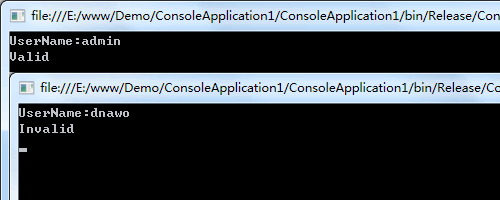
现在我们想修改下,不管用户输入什么用户名都返回是有效的。在Reflector中打开应用程序,发现作者没有对源代码进行加密/混淆,并且判断逻辑由CheckUser函数完成:
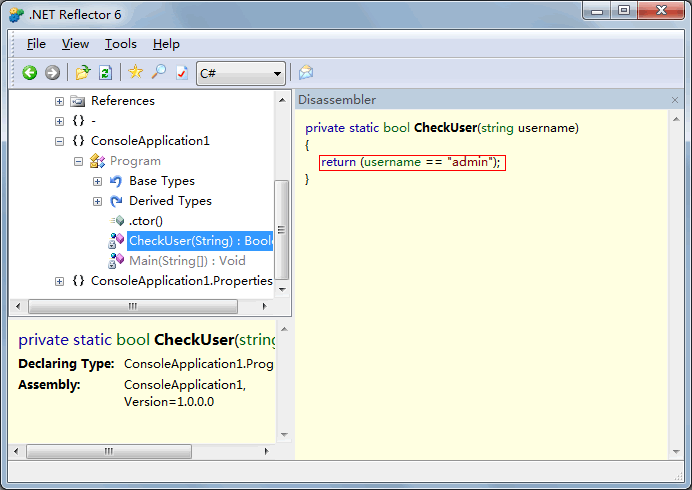
好了,这样子我们就可以使用ILdasm+ILasm对其进行修改了。
一、使用ILdasm将exe文件反编译为IL代码
打开VS2008命令行工具,执行如下命令:
D:\Program Files\Microsoft Visual Studio 9.0\VC>ildasm /out=f:\test\ConsoleApplication1.il f:\test\ConsoleApplication1.exe将会生成ConsoleApplication1.res和ConsoleApplication1.il两个文件。
二、IL代码修改
用记事本打开ConsoleApplication1.il文件,找到如下内容:
.method private hidebysig static bool  CheckUser(string username) cil managed
{
// 代码大小       17 (0x11)
.maxstack  8
IL_0000:  ldarg.0
IL_0001:  ldstr      "admin"
IL_0006:  call       bool [mscorlib]System.String::op_Equality(string,
                                                               string)
IL_000b:  brfalse.s  IL_000f

IL_000d:  ldc.i4.1
IL_000e:  ret

IL_000f:  ldc.i4.0
IL_0010:  ret
} // end of method Program::CheckUser修改第IL_000f行内容并保存:
IL_000f: ldc.i4.1三、使用ILasm将IL代码编译成exe文件
在VS2008命令行工具执行如下命令:
D:\Program Files\Microsoft Visual Studio 9.0\VC>ilasm /resource=f:\test\ConsoleApplication1.res /output=f:\test\ConsoleApplication2.exe /exe f:\test\ConsoleApplication1.il

Microsoft (R) .NET Framework IL Assembler.  Version 2.0.50727.4927
Copyright (c) Microsoft Corporation.  All rights reserved.
Assembling 'f:\test\ConsoleApplication1.il'  to EXE --> 'f:\test\ConsoleApplication2.exe'
Source file is ANSI

Assembled method ConsoleApplication1.Program::Main
Assembled method ConsoleApplication1.Program::CheckUser
Assembled method ConsoleApplication1.Program::.ctor
Assembled method ConsoleApplication1.Properties.Settings::get_Default
Assembled method ConsoleApplication1.Properties.Settings::.ctor
Assembled method ConsoleApplication1.Properties.Settings::.cctor
Creating PE file

Emitting classes:
Class 1:        ConsoleApplication1.Program
Class 2:        ConsoleApplication1.Properties.Settings

Emitting fields and methods:
Global
Class 1 Methods: 3;
Class 2 Fields: 1;      Methods: 3;
Resolving local member refs: 5 -> 5 defs, 0 refs, 0 unresolved

Emitting events and properties:
Global
Class 1
Class 2 Props: 1;
Resolving local member refs: 0 -> 0 defs, 0 refs, 0 unresolved
Writing PE file
Operation completed successfully结果生成一个ConsoleApplication2.exe文件,运行看下:
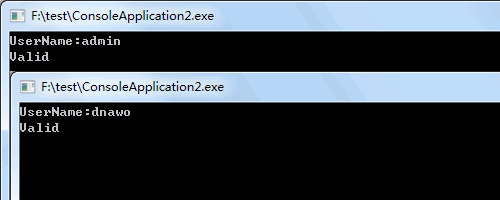
可以了🙂
评论(0)
暂无评论。