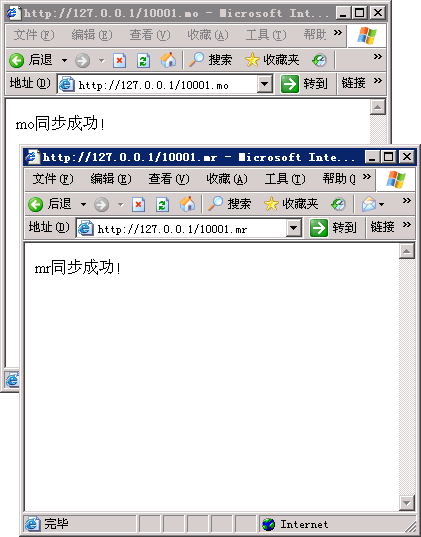
mo同步:http://127.0.0.1/10001.mo
mr同步:http://127.0.0.1/10001.mr
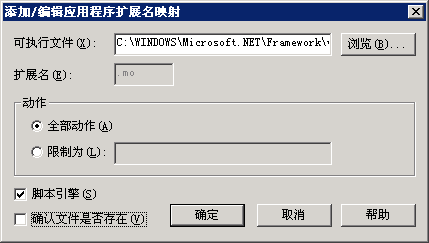
要做到这样其实也很简单,只需将原本的.aspx页面扩展名改为.mo或.mr,并且在IIS中添加相应的应用程序扩展即可:
.mo C:\WINDOWS\Microsoft.NET\Framework\v2.0.50727\aspnet_isapi.dll
.mr C:\WINDOWS\Microsoft.NET\Framework\v2.0.50727\aspnet_isapi.dll
但这样出现的问题是在vs中修改文件不方便,下边我们利用IHttpHandler实现ASP.NET URL重写的方法来实现。
为ASP.NET应用程序添加新的文件类型
1.编写一个IHttpHandler实现类
using System;
using System.Collections.Generic;
using System.Text.RegularExpressions;
using System.Web;

/// <summary>
///OwnHttpHandler 的摘要说明
/// </summary>
public class OwnHttpHandler : IHttpHandler
{

    #region IHttpHandler 成员

    public bool IsReusable
    {
        get { return true; }
    }

    public void ProcessRequest(HttpContext context)
    {
        Match match;
        match = Regex.Match(context.Request.Path, @"^/(\w+)\.mo", RegexOptions.IgnoreCase);
        if (match.Success)
        {
            context.Response.Write("mo同步成功!");
        }
        else
        {
            match = Regex.Match(context.Request.Path, @"^/(\w+)\.mr", RegexOptions.IgnoreCase);
            if (match.Success)
            {
                context.Response.Write("mr同步成功!");
            }
            else
            {
                context.Response.Write("未知同步类型!");
            }
        }
    }

    #endregion

}2.配置web.config
<?xml version="1.0" encoding="utf-8"?>
<configuration>
    <system.web>
        <compilation debug="false" />
        <authentication mode="Windows" />
      [color=Green]<httpHandlers>
        <add verb="*" path="/*.mo" type="OwnHttpHandler" />
        <add verb="*" path="/*.mr" type="OwnHttpHandler" />
      </httpHandlers>[/color]
    </system.web>
</configuration>3.在IIS中为站点添加应用程序扩展[1]
4.效果预览:
补充说明
[1].因为.mo和.mr文件实际是不存在的,所以添加应用程序扩展时一定不能钩选"确认文件是否存在",否则将返回404,可以留意看下.aspx的应用程序扩展,也是一样没有钩选,这个细节一定要注意!
评论(0)
暂无评论。