<!DOCTYPE html PUBLIC "-//W3C//DTD XHTML 1.0 Transitional//EN" "http://www.w3.org/TR/xhtml1/DTD/xhtml1-transitional.dtd">
<html xmlns="http://www.w3.org/1999/xhtml">
<head>
<meta http-equiv="Content-Type" content="text/html; charset=utf-8" />
<title>DataTables示例 - Mzwu.COM</title>
<link rel="stylesheet" type="text/css" href="http://ajax.aspnetcdn.com/ajax/jquery.dataTables/1.9.4/css/jquery.dataTables.css">
<script type="text/javascript" charset="utf8" src="http://ajax.aspnetcdn.com/ajax/jQuery/jquery-1.8.2.min.js"></script>
<script type="text/javascript" charset="utf8" src="http://ajax.aspnetcdn.com/ajax/jquery.dataTables/1.9.4/jquery.dataTables.min.js"></script>
<script type="text/javascript">
$(document).ready(function(){
	$("#example").dataTable();
});
</script>
</head>
<body>
<table id="example" width="100%" border="0" cellspacing="0" cellpadding="0">
  <thead>
    <tr>
      <td>Id</td>
      <td>Name</td>
      <td>Url</td>
    </tr>
  </thead>
  <tbody>
    <tr>
      <td>1</td>
      <td>木子屋</td>
      <td>http://www.mzwu.com/</td>
    </tr>
    <tr>
      <td>2</td>
      <td>百度</td>
      <td>http://www.baidu.com/</td>
    </tr>
    <tr>
      <td>3</td>
      <td>谷歌</td>
      <td>http://www.google.com/</td>
    </tr>
  </tbody>
</table>
</body>
</html>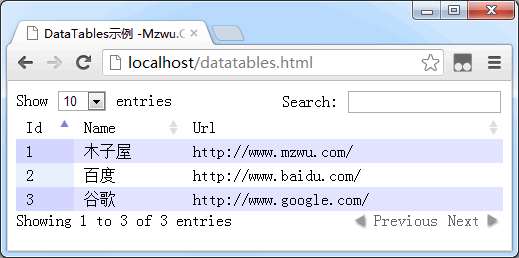
在上图可以看到,DataTables插件为table添加了额外的5个功能:每页记录数、搜索、排序、信息及分页。
一、5个功能基本设置
1.每页记录数
$("#example").dataTable({
	"bLengthChange": true,
    "aLengthMenu": [[10, 25, 50, -1], [10, 25, 50, "All"]],
	"iDisplayLength": 10
});说明:必须bPaginate=true时,bLengthChange=true才能显示。
2.搜索
$("#example").dataTable({
	"bFilter": true
});3.排序
$("#example").dataTable({
	"bSort": true,
	"aaSorting": [[0,'asc'], [1,'asc']]
});4.信息
$("#example").dataTable({
	"bInfo": true
});5.分页
$("#example").dataTable({
	"bPaginate": true,
	"sPaginationType": "full_numbers" //two_button (default) and full_numbers
});二、5个功能全局设置
$.extend($.fn.dataTable.defaults, {
	"bLengthChange": false,
	"bFilter": false,
	"bSort": false
});
$("#example").dataTable();
三、5个功能位置调整
$("#example").dataTable({
	"sDom": 'iptlf'
});sDom属性值具体含义:
·l - Length changing
·f - Filtering input
·t - The table!
·i - Information
·p - Pagination
·r - pRocessing
·< and > - div elements
·<"class" and > - div with a class
四、5个功能语言设置
$("#example").dataTable({
	"oLanguage": {
		"sLengthMenu": "Display _MENU_ records per page",
		"sZeroRecords": "Nothing found - sorry",
		"sSearch": "Search all columns:",
		"sInfo": "Showing _START_ to _END_ of _TOTAL_ records",
		"sInfoEmpty": "Showing 0 to 0 of 0 records",
		"sInfoFiltered": "(filtered from _MAX_ total records)",
		"oPaginate": {
			"sFirst": "First",
			"sPrevious": "Previous",
			"sNext": "Next",
			"sLast": "Last"
		}
	}
});
评论(0)
暂无评论。