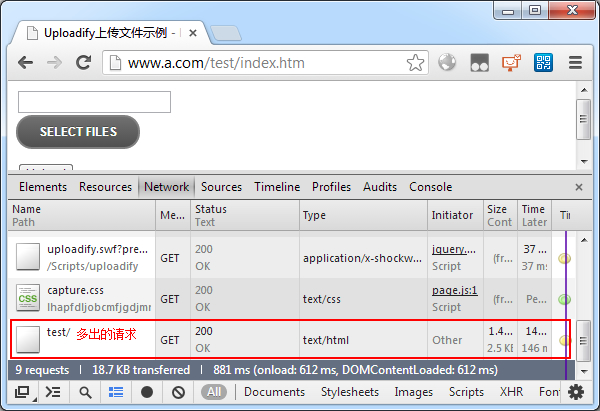
根据观察的结果,总结了错误现象:Uploadify总会向当前url最右侧的/的左边部分发起请求。
为方便解决问题,页面改用未压缩的Uploadify脚本文件(jquery.uploadify.js),并在脚本中搜索location,找到了相关代码:
SWFUpload.completeURL = function (a) {
    if (typeof (a) !== "string" || a.match(/^https?:\/\//i) || a.match(/^\//)) {
        return a;
    }
    var c = window.location.protocol + "//" + window.location.hostname + (window.location.port ? ":" + window.location.port : "");
    [u]var b = window.location.pathname.lastIndexOf("/");[/u]
    if (b <= 0) {
        path = "/";
    }
    else {
        path = window.location.pathname.substr(0, b) + "/";
    }
    return path + a;
};继续搜索completeURL,找到相关代码:
if (!this.settings.preserve_relative_urls) {
    this.settings.upload_url = SWFUpload.completeURL(this.settings.upload_url);
    this.settings.button_image_url = SWFUpload.completeURL(this.settings.button_image_url);
}感觉问题应该就出在这里,在completeURL方法中加入调试代码输出参数a的值,结果如下:
console.log("a:" + a);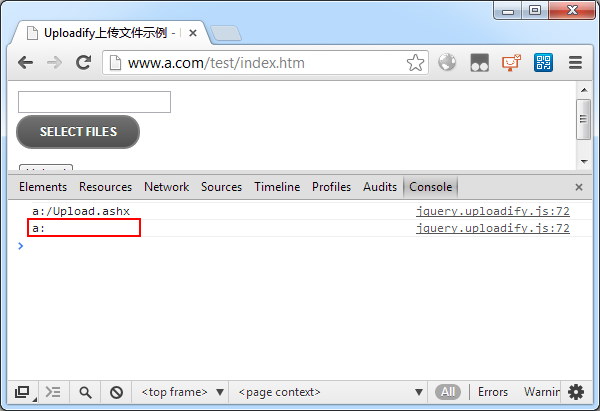
原因很清楚了,button_image_url是按钮图片地址,因为this.settings.button_image_url为空值,传入completeURL方法后返回一个错误地址,页面向这个地址加载图片所以出错了。
尝试给Uploadify上传按钮设置一张图片:
$("#file1").uploadify({
    swf: "/uploadify/uploadify.swf",
    uploader: "/Upload.ashx",
    fileTypeExts: "*.apk;*.zip;*.rar;*.7z",
    fileSizeLimit: "10MB",
    uploadLimit: 1,
    auto: false,
    multi: false,
    [color=Red]buttonImage: "/Images/scwjBtn.gif",[/color]
    onUploadSuccess: function (file, data) {
        alert(file.name + "上传成功!");
    }
});刷新页面发现还是有错误请求,this.settings.button_image_url的值仍是空。
我们知道,Uploadify内部是使用SWFUpload,会不会是Uploadify没有将buttonImage的值赋值给SWFUpload的button_image_url?查看代码,果然没有,加上:
// Prepare settings for SWFUpload
var swfUploadSettings = {
	assume_success_timeout   : settings.successTimeout,
	button_placeholder_id    : settings.id,
	button_width             : settings.width,
	button_height            : settings.height,
	button_text              : null,
	button_text_style        : null,
	button_text_top_padding  : 0,
	button_text_left_padding : 0,
	[color=Red]button_image_url         : settings.buttonImage,[/color]
	button_action            : (settings.multi ? SWFUpload.BUTTON_ACTION.Select_FILES : SWFUpload.BUTTON_ACTION.Select_FILE),
	button_disabled          : false,
	button_cursor            : (settings.buttonCursor == 'arrow' ? SWFUpload.CURSOR.ARROW : SWFUpload.CURSOR.HAND),
	button_window_mode       : SWFUpload.WINDOW_MODE.TRANSPARENT,
	debug                    : settings.debug,
	requeue_on_error         : settings.requeueErrors,
	file_post_name           : settings.fileObjName,
	file_size_limit          : settings.fileSizeLimit,
	file_types               : settings.fileTypeExts,
	file_types_description   : settings.fileTypeDesc,
	file_queue_limit         : settings.queueSizeLimit,
	file_upload_limit        : settings.uploadLimit,
	flash_url                : settings.swf,
	prevent_swf_caching      : settings.preventCaching,
	post_params              : settings.formData,
	upload_url               : settings.uploader,
	use_query_string         : (settings.method == 'get'),

	// Event Handlers
	file_dialog_complete_handler : handlers.onDialogClose,
	file_dialog_start_handler    : handlers.onDialogOpen,
	file_queued_handler          : handlers.onSelect,
	file_queue_error_handler     : handlers.onSelectError,
	swfupload_loaded_handler     : settings.onSWFReady,
	upload_complete_handler      : handlers.onUploadComplete,
	upload_error_handler         : handlers.onUploadError,
	upload_progress_handler      : handlers.onUploadProgress,
	upload_start_handler         : handlers.onUploadStart,
	upload_success_handler       : handlers.onUploadSuccess
}再刷新页面,错误没有了:
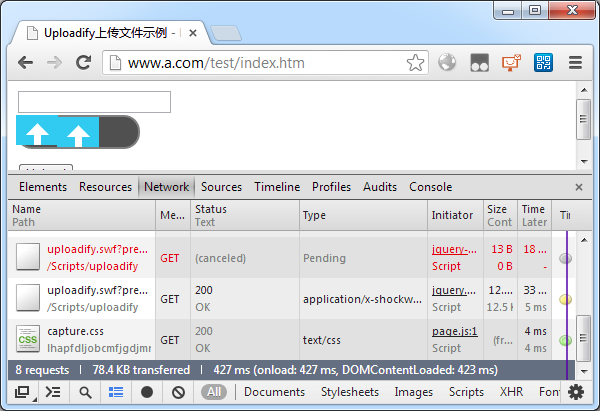

但是不设置按钮图片时仍有错误,怎么解决呢?修改button_image_url赋值处代码:
if (this.settings.button_image_url) this.settings.button_image_url = SWFUpload.completeURL(this.settings.button_image_url);好吧,我不会告诉你,其实只要修改这一处就可以了,上面的不修改按钮图片也能正常显示的。
评论(0)
暂无评论。