<!DOCTYPE html>

<html lang="en" xmlns="http://www.w3.org/1999/xhtml">
<head>
    <meta charset="utf-8" />
    <title>jQuery测试页-Mzwu.COM</title>
</head>
<body>
	<!-- 引入 jquery 1.8.0 -->
	<script type="text/javascript" src="http://code.jquery.com/jquery-1.8.0.min.js"></script>
	<script type="text/javascript">
		var $180 = $;
	</script>
	<!-- 引入 jquery 1.9.0 -->
	<script type="text/javascript" src="http://code.jquery.com/jquery-1.9.0.min.js"></script>
	<script type="text/javascript">
		var $190 = $;
	</script>
	<!-- 引入 jquery 2.0.0 -->
	<script type="text/javascript" src="http://code.jquery.com/jquery-2.0.0.min.js"></script>
	<script type="text/javascript">
		var $200 = $;
	</script>

	<script type="text/javascript">
		console.log($180.fn.jquery);
		console.log($190.fn.jquery);
		console.log($200.fn.jquery);
	</script>
</body>
</html>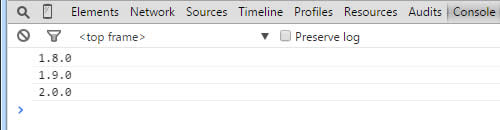
2.同一页面jQuery和其他js库冲突解决方法
①.jQuery在其他js库前
<!DOCTYPE html>

<html lang="en" xmlns="http://www.w3.org/1999/xhtml">
<head>
    <meta charset="utf-8" />
    <title>jQuery测试页-Mzwu.COM</title>
</head>
<body>
	<!-- 引入 jquery 1.8.0 -->
	<script type="text/javascript" src="http://code.jquery.com/jquery-1.8.0.min.js"></script>
	<script type="text/javascript">
		var $180 = $;
		console.log($.fn.jquery);
	</script>
	<!-- 引入 其他库-->
	<script type="text/javascript">
		$ = {
			fn:{
				jquery:"mzwu.com"
			}
		};
	</script>

	<script type="text/javascript">
		console.log($.fn.jquery);
		console.log($180.fn.jquery);
	</script>
</body>
</html>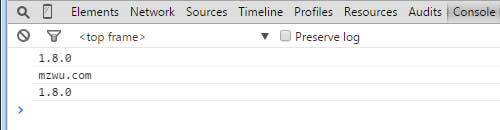
②.jQuery在其他js库后
<!DOCTYPE html>

<html lang="en" xmlns="http://www.w3.org/1999/xhtml">
<head>
    <meta charset="utf-8" />
    <title>jQuery测试页-Mzwu.COM</title>
</head>
<body>
	<!-- 引入 其他库-->
	<script type="text/javascript">
		$ = {
			fn:{
				jquery:"mzwu.com"
			}
		};
	</script>
	<!-- 引入 jquery 1.8.0 -->
	<script type="text/javascript" src="http://code.jquery.com/jquery-1.8.0.min.js"></script>

	<script type="text/javascript">
		console.log($.fn.jquery);
		var $180 = $.noConflict();
		console.log($.fn.jquery);
		console.log($180.fn.jquery);
	</script>
</body>
</html>当使用其他js库时,我们通过调用$.noConflict()以避免命名空间中的混淆。当这个函数被调用,$快捷方式将不再可用,迫使我们每次将写$的时候用jQuery代替 。然而,处理函数传递给.ready()方法可以带一个参数,这个参数就是全局的jQuery对象。这意味着我们可以重新命名上下文对象内的.ready()处理函数,而不影响其他代码:
jQuery(document).ready(function($) {
  // Code using $ as usual goes here.
});
评论(0)
暂无评论。