powershell.exe -command "&{%~dp0demo.ps1}"运行出错,提示无法加载文件,因为在此系统上禁止运行脚本:
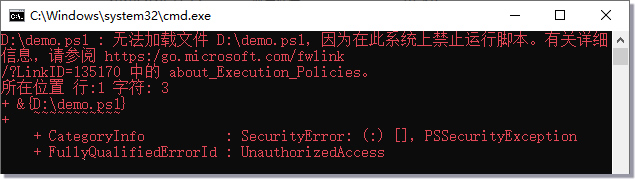
这是由于没有权限执行PowerShell脚本,修改批处理赋于执行权限即可:
powershell.exe -command "& {set-executionpolicy Remotesigned -Scope Process; .'%~dp0demo.ps1' }"powershell.exe -command "&{%~dp0demo.ps1}"powershell.exe -command "& {set-executionpolicy Remotesigned -Scope Process; .'%~dp0demo.ps1' }"
评论(0)
暂无评论。