1.数据准备
在SQL Server 2005执行下边sql,数据准备完成:
--create table
create table LogTB
(
	Id int identity(1,1) primary key,
	IPCount int,
	PVCount int,
	LogDate datetime
)
--insert into
insert into LogTB(IPCount,PVCount,LogDate)
select 10,25,'2010-06-25' union all
select 20,50,'2010-06-26' union all
select 30,75,'2010-06-27' union all
select 40,100,'2010-06-28' union all
select 50,125,'2010-06-29' union all
select 30,150,'2010-06-30'2.建立数据集
有人会奇怪,既然是动态绑定数据源,那还需要配置数据集吗?答案是要的,因为后面在配置图表的数据字段和类别字段时,必须从"网站数据源"中拖字段。但这个数据集只要一个表结构就可以了,不需要像上次那样建立数据源,这点要注意下。
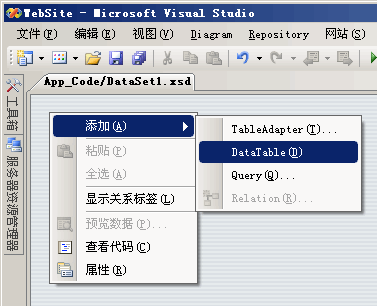
给站点添加一个数据集(xsd)文件,然后添加一个DataTable:
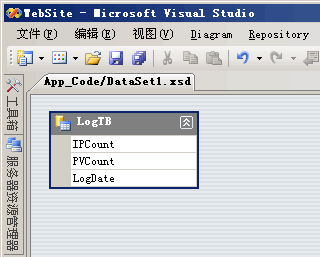
说明:DataTable每个字段的DataType属性必须和实际类型对应!
3.添加报表并和数据集关联
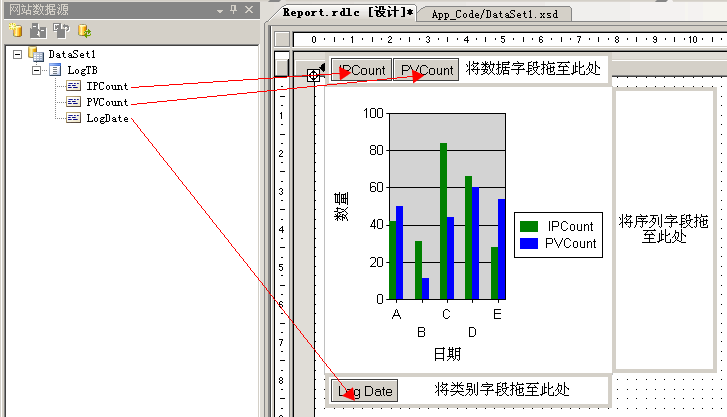
这个过程和之前的基本一样,没什么可说的了。
4.将报表显示到ASP.NET页面上
为站点添加一个ASP.NET页面,然后从"工具箱→报表"中拉一个MicrosoftReportViewer控件到页面上,配置MicrosoftReportViewer控件属性:
AsyncRendering=False
ShowToolBar=False
SizeToReportContent=True再输入下边代码:
protected void Page_Load(object sender, EventArgs e)
{
    if (!IsPostBack)
    {
        using (SqlConnection conn = new SqlConnection("Data Source=.;Initial Catalog=Northwind;Persist Security Info=True;User ID=sa;Password=sa"))
        {
            using (SqlDataAdapter adapter = new SqlDataAdapter("Select IPCount,PVCount,datepart(dd,LogDate) LogDate FROM [LogTB]", conn))
            {
                DataTable tb = new DataTable();
                adapter.Fill(tb);

                //ReportDataSource的name属性一定要和图表的DataSetName对应,本例都为DataSet1_LogTB
                Microsoft.Reporting.WebForms.ReportDataSource rds = new Microsoft.Reporting.WebForms.ReportDataSource("DataSet1_LogTB", tb);
                ReportViewer1.LocalReport.ReportPath = Server.MapPath("Report.rdlc");
                ReportViewer1.LocalReport.DataSources.Clear();
                ReportViewer1.LocalReport.DataSources.Add(rds);
                ReportViewer1.LocalReport.Refresh();
            }
        }
    }
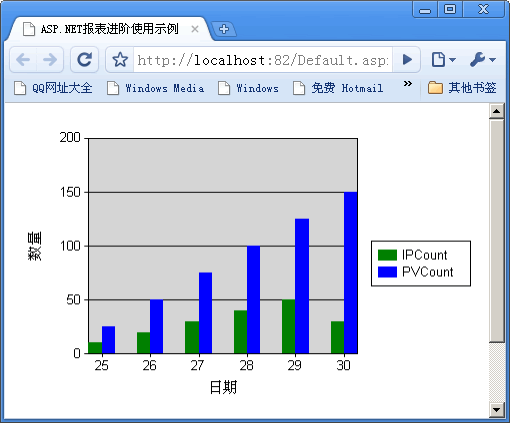
}全部步骤完成,预览下页面:
评论(0)
暂无评论。