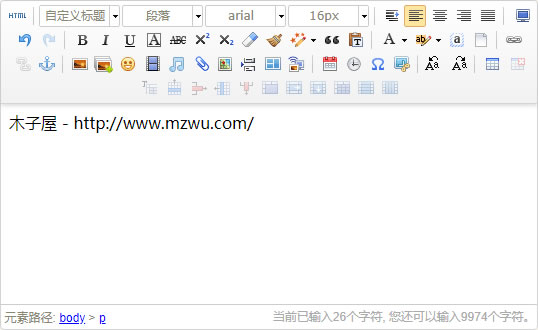
在UEditor官网下载ASP版本文件(ueditor1_4_3-utf8-asp.zip),解压到PJBlog根目录UEditor文件夹中,然后按照下边方法修改即可。
第一步:创建UEditor类文件UEditor.asp
<%
Class UEditor

	private sBasePath
	private sInstanceName
	private sWidth
	private sHeight
	private sToolbarSet
	private sValue

	Private Sub Class_Initialize()
		sBasePath		= "/UEditor"
		sWidth			= "100%"
		sHeight			= "200px"
		sToolbarSet		= "Default"
		sValue			= ""
	End Sub

	Public Property Let BasePath( basePathValue )
		sBasePath = basePathValue
	End Property

	Public Property Let InstanceName( instanceNameValue )
		sInstanceName = instanceNameValue
	End Property

	Public Property Let Width( widthValue )
		sWidth = widthValue
	End Property

	Public Property Let Height( heightValue )
		sHeight = heightValue
	End Property

	Public Property Let ToolbarSet( toolbarSetValue )
		sToolbarSet = toolbarSetValue
	End Property

	Public Property Let Value( newValue )
		If ( IsNull( newValue ) or IsEmpty( newValue ) ) Then
			sValue = ""
		Else
			sValue = newValue
		End If
	End Property

	' Generates the instace of the editor in the HTML output of the page.
	Public Sub Create( instanceName )
		response.write CreateHtml( instanceName )
	end Sub

	' Returns the html code that must be used to generate an instance of UEditor.
	Public Function CreateHtml( instanceName )
		dim html

		html = ""

		'加载编辑器的容器
		html = html &  Replace(Replace(Replace(Replace("<script id=""{0}"" name=""{0}"" type=""text/plain"" style=""width:{1};height:{2};"">{3}</script>", "{0}", instanceName), "{1}", sWidth), "{2}", sHeight), "{3}", sValue)
		'实例化编辑器
		If sToolbarSet="Basic" Then
			html = html & Replace("<script type=""text/javascript"">UE.getEditor('{0}', {toolbars: [['fullscreen', 'source', 'undo', 'redo', 'bold']]});</script>", "{0}", instanceName)
		Else
			html = html & Replace("<script type=""text/javascript"">UE.getEditor('{0}', {toolbars: [['fullscreen', 'source', '|', 'customstyle', 'paragraph', 'fontfamily', 'fontsize', '|','indent', 'justifyleft', 'justifycenter', 'justifyright', 'justifyjustify', '|','undo', 'redo', '|','bold', 'italic', 'underline', 'fontborder', 'strikethrough', 'superscript', 'subscript', 'removeformat', 'formatmatch', 'autotypeset', 'blockquote', 'pasteplain', '|', 'forecolor', 'backcolor', 'selectall', 'cleardoc', '|','link', 'unlink', 'anchor', '|','simpleupload', 'insertimage', 'emotion', 'insertvideo', 'music', 'attachment', 'map', 'pagebreak', 'template', 'background', '|','date', 'time', 'spechars', 'snapscreen', '|','touppercase', 'tolowercase', '|','inserttable', 'deletetable', 'insertparagraphbeforetable', 'insertrow', 'deleterow', 'insertcol', 'deletecol', 'mergecells', 'mergeright', 'mergedown', 'splittocells', 'splittorows', 'splittocols']]});</script>", "{0}", instanceName)
		End If

		CreateHtml = html

	End Function

	Public Sub LoadScript()
		dim html
		html = ""
		html = html & "<script type=""text/javascript"" charset=""utf-8"" src=""" & sBasePath & "/ueditor.config.js""></script>"
		html = html & "<script type=""text/javascript"" charset=""utf-8"" src=""" & sBasePath & "/ueditor.all.min.js""> </script>"
		html = html & "<script type=""text/javascript"" charset=""utf-8"" src=""" & sBasePath & "/lang/zh-cn/zh-cn.js""></script>"
		Response.Write(html)
	End Sub
End Class

%>第二步:修改文件blogpost.asp
1、删除:
<!--#include file="FCKeditor/fckeditor.asp" -->新增:
[color=Red]<!--#include file="UEditor/UEditor.asp" -->[/color]2、找到:
<label title="FCK在线编辑器" for="ET2" accesskey="K"><input name="log_editType" type="radio" id="ET2" value="0" />FCKeditor</label>修改为:
<label title="[color=Red]UEditor[/color]" for="ET2" accesskey="E"><input name="log_editType" type="radio" id="ET2" value="0" />[color=Red]UEditor[/color]</label>3、找到:
Dim sBasePath
sBasePath = "FCKeditor/"
Dim oFCKeditor
Set oFCKeditor = New FCKeditor
oFCKeditor.BasePath = sBasePath
oFCKeditor.Config("AutoDetectLanguage") = False
oFCKeditor.Config("DefaultLanguage") = "zh-cn"
oFCKeditor.Value = ""
oFCKeditor.Height = "350"
oFCKeditor.Create "Message"修改为:
[color=Red]Dim oUEditor
Set oUEditor = New UEditor
oUEditor.LoadScript '只加载一次脚本
oUEditor.Value = ""
oUEditor.Create "Message"[/color]4、找到:
Dim oFCKeditor1
Set oFCKeditor1 = New FCKeditor
oFCKeditor1.BasePath = sBasePath
oFCKeditor1.Height = "150"
oFCKeditor1.ToolbarSet = "Basic"
oFCKeditor1.Config("AutoDetectLanguage") = False
oFCKeditor1.Config("DefaultLanguage") = "zh-cn"
oFCKeditor1.Value = ""
oFCKeditor1.Create "log_Intro"修改为:
[color=Red]Dim oUEditor1
Set oUEditor1 = New UEditor
oUEditor1.height = "100px"
oUEditor1.ToolbarSet = "Basic"
oUEditor1.Value = ""
oUEditor1.Create "log_Intro"[/color]第三步:修改文件blogedit.asp
1、删除:
<!--#include file="FCKeditor/fckeditor.asp" -->新增:
[color=Red]<!--#include file="UEditor/UEditor.asp" -->[/color]2、找到:
Dim sBasePath
sBasePath = "FCKeditor/"
Dim oFCKeditor
Set oFCKeditor = New FCKeditor
oFCKeditor.BasePath = sBasePath
oFCKeditor.Config("AutoDetectLanguage") = False
oFCKeditor.Config("DefaultLanguage") = "zh-cn"
oFCKeditor.Value = UnCheckStr(lArticle.logMessage)
oFCKeditor.Height = "350"
oFCKeditor.Create "Message"修改为:
[color=Red]Dim oUEditor
Set oUEditor = New UEditor
oUEditor.LoadScript '只加载一次脚本
oUEditor.Value = UnCheckStr(lArticle.logMessage)
oUEditor.Create "Message"[/color]3、找到:
Dim oFCKeditor1
Set oFCKeditor1 = New FCKeditor
oFCKeditor1.BasePath = sBasePath
oFCKeditor1.Height = "150"
oFCKeditor1.ToolbarSet = "Basic"
oFCKeditor1.Config("AutoDetectLanguage") = False
oFCKeditor1.Config("DefaultLanguage") = "zh-cn"
oFCKeditor1.Value = UnCheckStr(lArticle.logIntro)
oFCKeditor1.Create "log_Intro"修改为:
[color=Red]Dim oUEditor1
Set oUEditor1 = New UEditor
oUEditor1.Height = "100px"
oUEditor1.ToolbarSet = "Basic"
oUEditor1.Value = UnCheckStr(lArticle.logIntro)
oUEditor1.Create "log_Intro"[/color]第四步:修改文件/class/cls_logAction.asp
1、找到(2处):
logIntro = closeHTML(CheckStr(SplitLines(logMessage, blog_introLine)))修改为:
[color=Red]logIntro = closeHTML(SplitLines(logMessage, blog_introLine))[/color]2、找到(2处):
weblog("log_Content") = CheckStr(logMessage)修改为:
[color=Red]If Int(logEditType) =1 Then
    weblog("log_Content") = CheckStr(logMessage)
Else
    weblog("log_Content") = logMessage
End If[/color]第五步:修改文件ConContent.asp
删除:
<!--#include file="FCKeditor/fckeditor.asp" -->OK,修改完成!
评论(1)