一、钉钉应用创建和配置
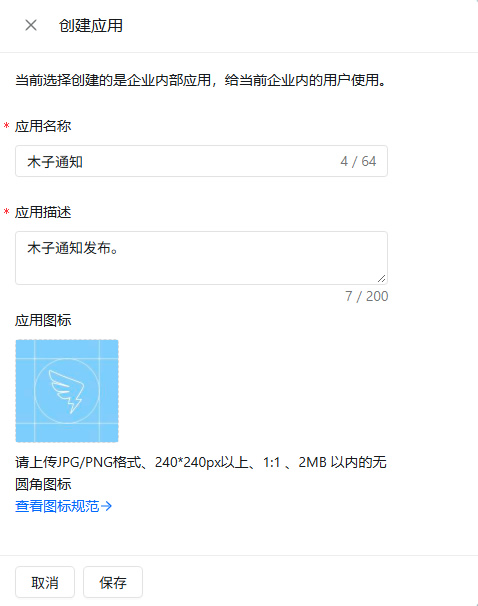
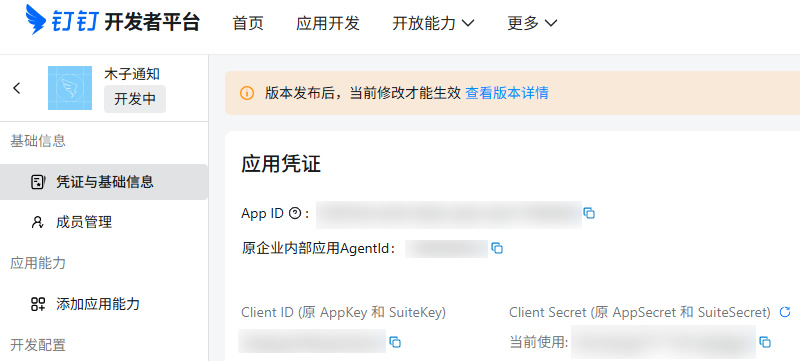
1.1 创建应用,获取AgentId、AppKey和AppSecret
登录钉钉开发者平台,打开应用开发>钉钉应用,创建应用,记下AgentId、AppKey和AppSecret:
1.2 开通发送工作通知权限
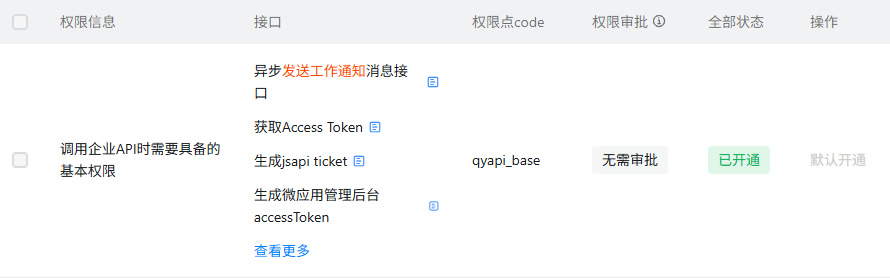
调用API发送工作通知需要申请开通权限,这个权限默认是开通的,可以在应用页面进入开发配置>权限管理,确认是否开通:
二、调用API给钉钉发送自定义消息
登录钉钉管理后台,打开通讯录>成员管理,获取成员UserID,和上面获取到的AgentId、AppKey和AppSecret一起填入下面程序即可发送消息:
<?php
declare(strict_types=1);

// Web 访问时输出纯文本(CLI 下不调用 header)
if (PHP_SAPI !== 'cli') {
    header('Content-Type: text/plain; charset=utf-8');
}

// ============================ 配置区:请替换为你的真实值 ============================
const APP_KEY     = '你的AppKey';       // 钉钉开放平台 → 应用详情 → AppKey
const APP_SECRET  = '你的AppSecret';    // 钉钉开放平台 → 应用详情 → AppSecret
const AGENT_ID    = 123456789;          // 微应用的 AgentId(整型)
const TO_USER     = 'userid1,userid2';  // 接收人 userid,多个用英文逗号分隔,最大 100 个
const MSG_CONTENT = '自定义消息';         // 消息内容
// =====================================================================================

// ---------- 1. 获取 access_token ----------
// GET https://oapi.dingtalk.com/gettoken?appkey=APP_KEY&appsecret=APP_SECRET
$token = getAccessToken();
if ($token === null) {
    exit(1);
}
echo "获取 access_token 成功\n";

// ---------- 2. 发送工作通知(文本消息)----------
// POST https://oapi.dingtalk.com/topapi/message/corpconversation/asyncsend_v2?access_token=ACCESS_TOKEN
[$result, $err] = sendTextMessage($token, TO_USER, AGENT_ID, MSG_CONTENT);

if ($err !== null) {
    echo '[asyncsend_v2] ' . $err . "\n";
    exit(1);
}

if (($result['errcode'] ?? -1) === 0) {
    echo '消息发送请求成功,errmsg: ' . ($result['errmsg'] ?? 'ok') . "\n";
    if (!empty($result['task_id'])) {
        echo 'task_id: ' . $result['task_id'] . "\n";
        echo "注意:asyncsend_v2 为异步接口,task_id 仅代表请求已受理,不代表用户一定收到。\n";
    }
    exit(0);
}

echo sprintf(
    "[asyncsend_v2] errcode=%d errmsg=%s\n",
    $result['errcode'] ?? -1,
    $result['errmsg'] ?? ''
);
// 常见失败原因排查提示(钉钉侧常见错误码)
if (($result['errcode'] ?? 0) === 40089) {
    echo "可能原因:userid_list 中存在无效的 userid,或接收人不在应用可见范围内。\n";
}
if (($result['errcode'] ?? 0) === 40014) {
    echo "可能原因:access_token 无效或已过期。\n";
}
if (($result['errcode'] ?? 0) === 60011) {
    echo "可能原因:应用没有发送工作通知的权限,请检查应用权限配置。\n";
}
exit(1);

/**
 * 获取钉钉 access_token
 */
function getAccessToken(): ?string
{
    $url = 'https://oapi.dingtalk.com/gettoken'
        . '?appkey=' . urlencode(APP_KEY)
        . '&appsecret=' . urlencode(APP_SECRET);

    [$data, $err] = httpRequest($url);
    if ($err !== null) {
        echo '[gettoken] ' . $err . "\n";
        return null;
    }
    if (($data['errcode'] ?? 1) !== 0) {
        echo sprintf(
            "[gettoken] errcode=%d errmsg=%s\n",
            $data['errcode'] ?? -1,
            $data['errmsg'] ?? ''
        );
        return null;
    }
    return $data['access_token'] ?? null;
}

/**
 * 异步发送工作通知(文本消息)
 *
 * @return array{0: array|null, 1: string|null} [接口返回的 JSON 数组, 请求错误信息]
 */
function sendTextMessage(string $token, string $toUser, int $agentId, string $content): array
{
    $url = 'https://oapi.dingtalk.com/topapi/message/corpconversation/asyncsend_v2'
        . '?access_token=' . urlencode($token);

    $payload = [
        'agent_id'    => $agentId,
        'userid_list' => $toUser,
        'msg'         => [
            'msgtype' => 'text',
            'text'    => ['content' => $content],
        ],
    ];

    return httpRequest($url, 'POST', json_encode($payload, JSON_UNESCAPED_UNICODE));
}

/**
 * 基于 cURL 的 HTTP 请求封装
 *
 * 说明:PHP 8.0+ 的 curl 句柄由引擎自动释放,无需(也不应)调用 curl_close()。
 *
 * @return array{0: array|null, 1: string|null} [解码后的 JSON 数组, 错误信息]
 */
function httpRequest(string $url, string $method = 'GET', ?string $body = null): array
{
    $ch = curl_init($url);

    $options = [
        CURLOPT_RETURNTRANSFER => true,
        CURLOPT_TIMEOUT        => 10,
        CURLOPT_SSL_VERIFYPEER => true,
        CURLOPT_SSL_VERIFYHOST => 2,
    ];

    // 仅当 cacert.pem 存在且为有效 PEM 文本时才指定 CAINFO;
    // 文件缺失/损坏时跳过,回退到 php.ini 的 curl.cainfo 配置
    $caInfo = __DIR__ . '/cacert.pem';
    if (is_file($caInfo) && filesize($caInfo) > 0
        && strpos((string)file_get_contents($caInfo, false, null, 0, 1024), '-----BEGIN CERTIFICATE-----') !== false
    ) {
        $options[CURLOPT_CAINFO] = $caInfo;
    } else {
        echo '[提示] cacert.pem 缺失或无效,未指定 CAINFO,将依赖 php.ini 的 curl.cainfo;'
            . "若仍报证书错误,请重新下载有效的 cacert.pem\n";
    }

    curl_setopt_array($ch, $options);

    if ($method === 'POST') {
        curl_setopt($ch, CURLOPT_POST, true);
        if ($body !== null) {
            curl_setopt($ch, CURLOPT_POSTFIELDS, $body);
            curl_setopt($ch, CURLOPT_HTTPHEADER, ['Content-Type: application/json; charset=utf-8']);
        }
    }

    $resp = curl_exec($ch);
    if ($resp === false) {
        return [null, 'curl error: ' . curl_error($ch)];
    }
    $httpCode = curl_getinfo($ch, CURLINFO_HTTP_CODE);

    $data = json_decode($resp, true);
    if (!is_array($data)) {
        return [null, '响应不是合法 JSON(HTTP ' . $httpCode . '): ' . substr($resp, 0, 200)];
    }
    return [$data, null];
}最终效果:
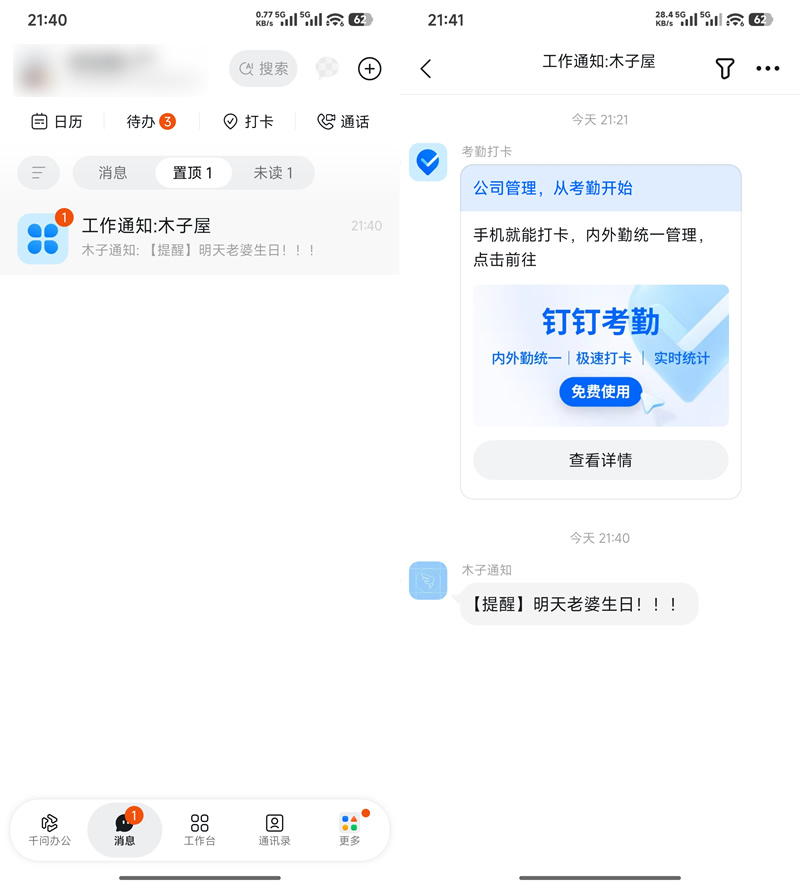
👉说明:企业内部应用每天给每个员工最多可发送500条消息通知,单次最多只能给5000人发送,同一员工一天只能发送一条内容相同的消息通知。
相关链接
[1].钉钉开发者平台:https://open-dev.dingtalk.com/
[2].钉钉管理后台:https://oa.dingtalk.com/ (获取UserID)
[3].API文档:https://open.dingtalk.com/document/development/asynchronous-sending-of-enterprise-session-messages
评论(0)
暂无评论。