Google [站内搜索]

分类: Win编程预览模式: 普通 | 列表

WebBrowser.DocumentText中文乱码解决方法

private void webBrowser1_DocumentCompleted(object sender, WebBrowserDocumentCompletedEventArgs e)
{
    WebBrowser wb = sender as WebBrowser;
    Encoding encoding = Encoding.GetEncoding(wb.Document.Encoding);
    using (StreamReader stream = new StreamReader(wb.DocumentStream, encoding))

查看更多...

分类:Win编程 | 固定链接 | 评论: 0 | 引用: 0 | 查看次数: 4214
public class WebBrowserEventManager
{
    private EventHandlerList _ehList = new EventHandlerList();
    private WebBrowser _wb = null;

查看更多...

分类:Win编程 | 固定链接 | 评论: 0 | 引用: 0 | 查看次数: 6779

WPF应用程序入口函数(Main函数)小结

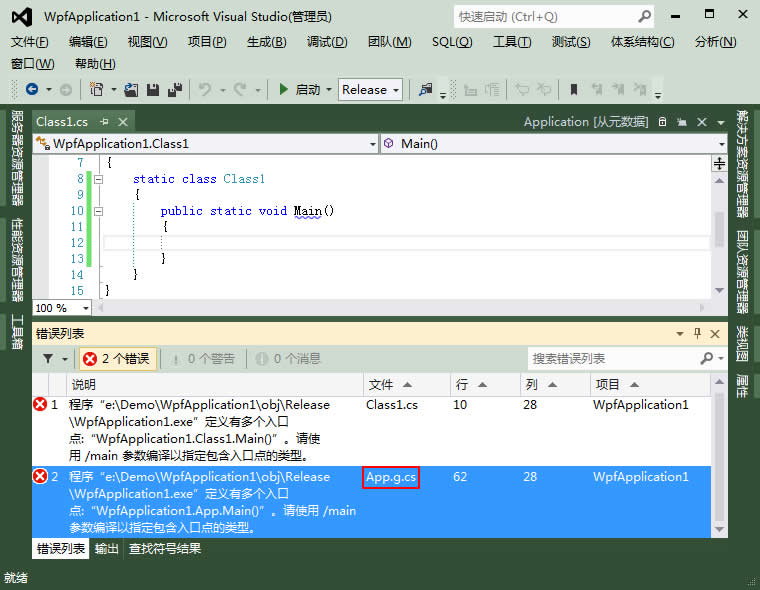
Windows窗体应用程序的入口函数在Program.cs文件中,但WPF应用程序没有这个文件,WPF应用程序入口函数在哪里呢?手工添加一个入口函数,生成项目,出错:


原来WPF应用程序入口函数在obj\Release\App.g.cs文件中:

查看更多...

分类:Win编程 | 固定链接 | 评论: 0 | 引用: 0 | 查看次数: 9190
不使用表达式树:

var query = context.People.Where(item => item.Age == 20);

引用内容 引用内容
Select
    [Extent1].[Id] AS [Id],

查看更多...

分类:Win编程 | 固定链接 | 评论: 0 | 引用: 0 | 查看次数: 2875

RichTextBox.Find遍历搜索字符串中的坑

RichTextBox.Find遍历搜索字符串有两个重载方法可供调用:

public int Find(string str, int start, RichTextBoxFinds options);
public int Find(string str, int start, int end, RichTextBoxFinds options);

经测试发现:在特定场合下这两个重载方法可能发生死循环,下面分别举栗说明。

查看更多...

分类:Win编程 | 固定链接 | 评论: 0 | 引用: 0 | 查看次数: 5841
今天使用LINQ to Entities时出现了一个错误,为方便说明创建了个Demo表用于还原问题:

create table Person
(
    Id int identity(1,1) primary key,

查看更多...

分类:Win编程 | 固定链接 | 评论: 0 | 引用: 0 | 查看次数: 6327

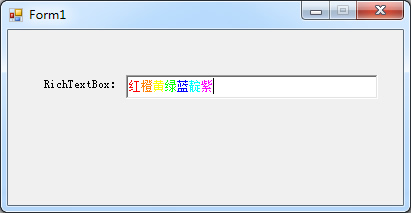
RichTextBox控件添加指定颜色文本示例


private void Form1_Load(object sender, EventArgs e)
{
    AppendText(richTextBox1, "红", Color.FromArgb(255, 0, 0));

查看更多...

分类:Win编程 | 固定链接 | 评论: 0 | 引用: 0 | 查看次数: 4317

JSON字符串转C#匿名对象工具

经常需在C#程序中使用第三方接口返回的JSON字符串,针对JSON写一个类反序列化太麻烦,Newtonsoft.Json有一个方法可以将JSON字符串转为C#匿名对象:

public static T DeserializeAnonymousType<T>(string value, T anonymousTypeObject)

那么问题就变成了怎么针对JSON写一个C#匿名对象,这简单多了:

查看更多...

分类:Win编程 | 固定链接 | 评论: 0 | 引用: 0 | 查看次数: 5197
static bool IsFile(string path)
{
    return !string.IsNullOrEmpty(Path.GetExtension(path));
}

当然了,f:\mzwu表示一个没有扩展名的文件也是可能的,有这情况存在的另想办法吧:)

查看更多...

分类:Win编程 | 固定链接 | 评论: 0 | 引用: 0 | 查看次数: 4687

C#打印时隐藏“正在打印”窗口的方法

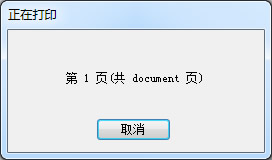
C#打印默认会显示“正在打印”窗口:


可通过设置PrintDocument.PrintController属性值隐藏“正在打印”窗口:

查看更多...

分类:Win编程 | 固定链接 | 评论: 0 | 引用: 0 | 查看次数: 4486